The Typeform alternative for firms.
Typeform is known for beautiful, conversational forms that show one question at a time. OneForm keeps that one-question-at-a-time feel — then finishes the job: every response becomes a report your team reviews and sends.
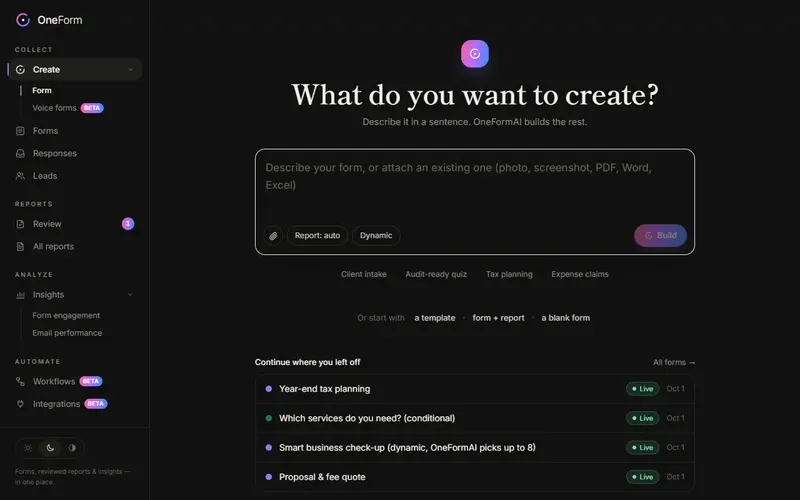
From form to finished report.
What a client-facing firm needs from a form, and how OneForm does each part.
| What you need | How OneForm does it |
|---|---|
| Build a form fast | Describe it in a sentence, or attach the PDF you use today. OneFormAI builds it. |
| Turn answers into advice | An AI-drafted report or document from every response, following your instructions. |
| Stay in control | Nothing reaches a client until someone on your team approves it. |
| Deliver professionally | A branded PDF, emailed now or on a schedule, with opens and clicks tracked. |
| Get paid for the report | Price the report and take payment on the thank-you screen with Stripe. |
| Book the next meeting | Your booking calendar on the thank-you screen, pre-filled. |
| Know who to call first | Every person scored on fit and intent, synced to your CRM. |
| Let clients talk | Voice forms: people speak, OneFormAI fills in the answers. |
Typeform is a trademark of its owner. OneForm isn't affiliated with Typeform.
Questions, answered.
Is OneForm a Typeform alternative?
Yes. OneForm shows one question at a time, with logic, scoring, themes and embeds. It's built for firms, so each response also becomes a reviewed, client-ready report.
Can I move my Typeform forms to OneForm?
Yes. Take a screenshot or export a PDF of the form you have, attach it in OneForm, and OneFormAI rebuilds it as an editable form — questions, choices and logic included. Then add the report.
Does OneForm work like Typeform on phones?
Yes. One question per screen, the right keyboard for each answer, and keyboard shortcuts on desktop.
From form to finished report, automatically.
Create your firm in a minute and build your first form today.