Know who's ready to talk.
Everyone who filled in a form, one row per person, ranked by how likely they are to become a client.
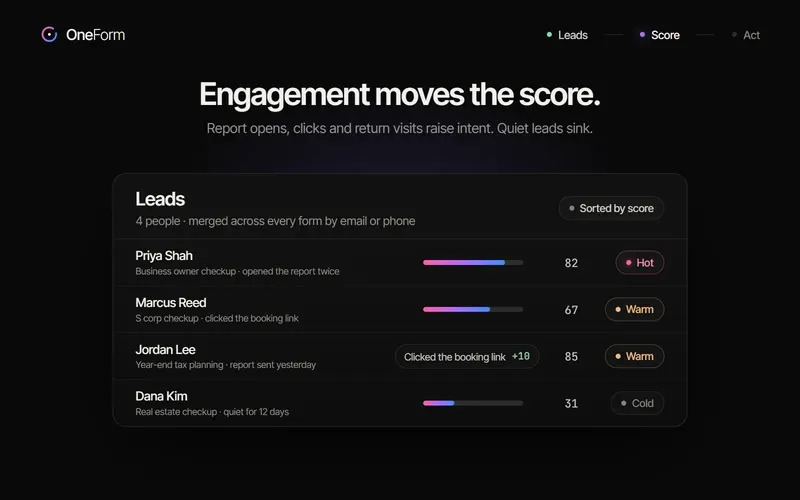
One row per person
Merged across every form by email or phone.
Fit plus intent
Answers and contact details, plus opens, clicks and return visits. Scores fade when people go quiet.
Sync to your CRM
HubSpot, Pipedrive, Salesforce or Zoho in one click, or export a CSV.
A ranked list of who to call first.
Every form response creates or updates a lead, merged across forms by email or phone, so one person is one row. Each lead gets an explainable score from 0 to 100: fit from their answers and contact details, plus intent from opens, clicks and return visits, minus red flags. Scores fade when people go quiet, so the list stays current.
- 01
Responses become leads
Everyone who submits any form appears once, merged by email or phone, with their answers and activity in one drawer.
- 02
Decide what counts
Add or subtract points per answer in the builder, or let OneFormAI suggest them. Choose the thresholds for hot, warm and cold.
- 03
Engagement moves the score
Report opens, clicks and return visits raise intent. Bounced emails, throwaway addresses and suspiciously fast answers are flagged.
- 04
Act on hot leads
Your team is emailed when a lead turns hot, workflows can route it, and leads sync to your CRM or Google Sheets.
Who it's for
Accounting firms
See which tax checkup prospects opened their report and came back, so partners call the ones most likely to engage.
Tax preparers
Separate people with a quick question from those ready for year-round planning, before the busy season starts.
Financial advisors
Rank discovery prospects by fit and interest, and sync them straight into HubSpot, Salesforce, Pipedrive or Zoho.
Start from a template
Questions, answered.
How is the lead score calculated?
Fit plus intent minus red flags. Fit comes from answers and contact details, intent from report opens, clicks and return visits. Every point has a reason you can see in the lead drawer.
Which CRMs does OneForm sync with?
HubSpot, Salesforce, Pipedrive and Zoho CRM, or any system through a webhook. Leads can also go to Google Sheets, one row per lead, or to a CSV in the format TaxDome's client import expects.
Do old leads stay hot forever?
No. Intent halves after a number of quiet days you choose, so stale leads sink down the list.
Can OneForm tell us when a lead is ready?
Yes. When a lead turns hot, your team gets an email and any workflow triggered by hot leads starts, once per person. The hot, warm and cold thresholds are yours to set.
Can we export or erase one person's data?
Yes. You can download everything OneForm holds about one person, or erase it for good.
Good advice starts with good questions.
Create your firm in a minute and send your first form today.