Every response, written up. Approved by you.
Every great report starts with a great question. OneFormAI drafts one from each response, following your instructions, and you edit, approve and send it as a branded PDF.
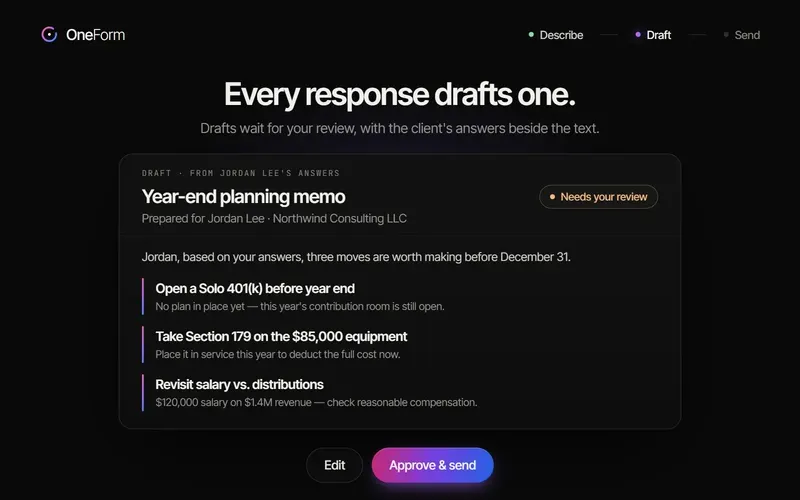
Drafts in your voice
Your instructions, your branding, a PDF ready to send.
Nothing goes out unreviewed
Approve, then send now or schedule it. Resend any time.
Know when it's read
Opens and clicks on every report email.
Drafted by AI. Approved by your team.
A questionnaire is where the work starts, not where it ends. Switch on reports and each response becomes a draft written to your instructions: an advisory report, or a document such as an engagement letter, proposal, invoice, tax organizer or document request. Nothing reaches a client until someone on your team approves it, and every report goes out as a branded PDF.
- 01
Describe the report
Say what the report should cover and OneFormAI writes the instructions. Use variables like the client's first name, your firm and your booking link.
- 02
Test it on a sample
Run the instructions on a real or sample response and read the result. Nothing is sent while you test.
- 03
Review each draft
Drafts wait in the review pile, with the client's answers beside the text. Edit in a rich-text editor, or re-draft with a note.
- 04
Approve and send
Send now or schedule it. The client gets an email with the PDF attached, and you see when it's opened and clicked.
Who it's for
Accounting firms
Send every prospect a personal tax opportunity report after an intake form, checked by a partner before it goes out.
Tax preparers
Turn organizer answers into a document request, checklist or engagement letter without retyping anything.
Financial advisors
Follow discovery with a first written summary that prospects will want to talk through at the next meeting.
Start from a template
Questions, answered.
Does OneForm send AI reports to clients automatically?
Not unless you choose to. By default every draft waits for someone on your team to approve it. Auto-send is optional, confirmed in writing, and holds back any report the AI didn't write or that has no email address.
What kinds of documents can it draft?
An advisory report, or one of 12 document types: engagement letter, proposal, invoice, bill, checklist, task list, tax organizer, document request, onboarding packet, memo, scope of work and HR record.
Can reports use my firm's branding?
Yes. Each report is a letter-size PDF with your logo, colors and page numbers, and the email carries your logo, sign-off and contact footer.
Does it learn from our edits?
Reviewers can rate each draft from one to five stars. Every few ratings, OneFormAI updates its writing rules for that form, and you can see and edit those rules in the Report tab.
Good advice starts with good questions.
Create your firm in a minute and send your first form today.