Discovery that ends in a plan.
Listen first, then advise. Prospects talk or type through discovery, and you send a first plan they'll want to discuss.
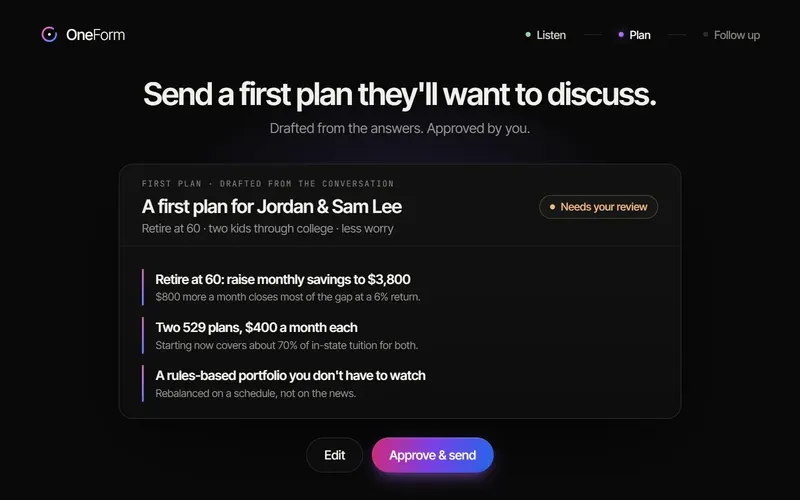
OneForm gives financial advisors a conversational discovery questionnaire that prospects type or talk through on a phone. Each response drafts a first-meeting summary in your voice, which you review before it goes out as a branded PDF with a button to book the meeting. Every prospect is scored and synced to your CRM.
Discovery by voice
A three-minute conversation instead of a twenty-field form.
Warm leads first
Scores rise as prospects open, click and come back.
Straight into your CRM
HubSpot, Salesforce, Pipedrive or Zoho in one click.
What should a financial advisor's discovery questionnaire ask?
Discovery is about goals, timing and what prompted the search, not account numbers. Ask what the prospect wants money to do, when, and what has changed: a new job, a sale, an inheritance, a retirement date. Ask for ranges, not statements. Suitability and risk questions belong in your compliance workflow after onboarding, and identity and account details belong on custodian paperwork, never in a form. Branch by life stage so a saver and a retiree each see a dozen questions that fit.
- Three goals in their own words, and which one matters most this year
- Life stage, work situation and expected retirement timing
- Household income and investable assets in bands
- Whether they work with an advisor now, what prompted them to reach out, and how soon they want to talk
Can prospects answer discovery by voice?
Yes. A voice form asks the same questions aloud and writes each answer into the right field. One tap starts it on a phone, with the transcript on screen; questions the prospect has already answered in passing are skipped, and emails and phone numbers are read back before they are saved. Only the text is kept, never the recording. Your logic still decides what is asked and when the conversation is done, and prospects can switch to typing at any point with their answers carried over. Voice forms are in beta, on Pro and Firm.
What does the prospect receive after discovery?
Each response drafts a short summary to your instructions: what they told you, the questions the first meeting should cover, and what to bring. It is a meeting-prep document, not advice, and you read and edit every draft before it goes. Approve it and the prospect gets a branded PDF by email with a booking button under it. You see when the email is opened and the link clicked, and a reminder goes out if it is not opened.
- Instructions in plain words, tested on a sample response before anything is sent
- A rich-text editor with the prospect's answers beside the draft
- Send now, schedule for tomorrow morning, or resend to a new address
How does discovery feed HubSpot, Salesforce or your CRM?
Everyone who completes a form becomes one lead, merged across forms by email or phone, with a 0 to 100 score. Fit comes from their answers and contact details; intent from report opens, clicks and return visits. Scores fade when people go quiet, so the list stays current. Push leads to HubSpot, Salesforce, Pipedrive or Zoho CRM in one click, or to any system by webhook, and your team is emailed the moment a lead turns hot.
- Points per answer, set by you or suggested by OneFormAI
- Hot, warm and cold thresholds you choose
- CSV export, Google Sheets rows and the REST API on Basic and up
How do advisors qualify prospects before they book?
Give answers points and send each prospect to a different ending by score. Good-fit prospects see your calendar on the thank-you screen: two weeks of open times in their time zone, synced to Google Calendar, with a Google Meet link, a phone call or your own meeting link. Prospects outside your minimum see a polite ending with a resource instead. If you prefer Calendly, Cal.com or another tool, embed it with name, email and time zone pre-filled. Paid first consultations run through your own Stripe account.
A solo advisor in Colorado replaces a twenty-field intake PDF
A discovery form from website to first meeting, with every step a shipped feature.
- 01
The advisor describes the questionnaire to Create with AI in two sentences and gets a 14-question form with branches by life stage, then adds an Answer with voice option.
- 02
The form goes on the website as a chat bubble, and the Retirement & Roth checkup goes in the newsletter as a lead magnet.
- 03
A couple nearing retirement talk through it on a phone in four minutes. The business-owner branch is skipped; the RMD and Roth questions show.
- 04
OneFormAI drafts a first-meeting summary. The advisor tightens the goals paragraph, removes a line, and approves.
- 05
The couple receive the PDF with a Book a meeting button, pick a slot, and the call lands on the advisor's Google Calendar with a Meet link.
- 06
The lead syncs to HubSpot with its score and reasons, and turns hot when the PDF is opened twice before the meeting.
Start from one of these
Questions, answered.
Is the discovery summary investment advice?
No. It is a draft prepared from the prospect's answers to your instructions, and you review and edit it before it goes anywhere. Most advisors use it as meeting preparation: what the prospect said, what to discuss, what to bring. The ready-made retirement and investment checkups are written the same way, without investment recommendations.
What should stay out of a discovery form?
Account numbers, Social Security numbers, dates of birth, logins, statements and any document. A OneForm form asks questions in ranges; identity and account details go on custodian and onboarding paperwork after the prospect engages. Connected-app credentials are encrypted at rest, AI drafting runs with data storage turned off at the AI provider, and the security page covers the rest.
Which CRMs does OneForm sync with?
HubSpot, Salesforce, Pipedrive and Zoho CRM, each connected with a sign-in rather than a pasted key. Every response creates or updates the contact. Other systems can receive each response by signed webhook or through the REST API, and leads can also land one row each in Google Sheets. CRM sync is on Pro and Firm.
Can prospects talk instead of type?
Yes, on Pro and Firm. Start the form as a conversation or add an Answer with voice button to a typed form. Choose one of ten AI voices and your brand colors. Only the transcript is kept, never the recording, and a prospect can switch to typing at any time without losing their answers. Voice forms are in beta.
Can the form live on my website next to Calendly?
Yes. Embed it inline, as a popup, a chat bubble or a button on any site, on Basic and up; share links and QR codes work on every plan. On the thank-you screen, show OneForm's own booking page or an embedded Calendly, Cal.com, Acuity or similar page with the prospect's name, email and time zone already filled in.
Which plan suits a solo advisor?
Free Forever runs three live forms with 50 responses a month and reports with review. Basic at $19 a month adds website embeds, analytics and scheduled sends. Pro at $49 a month adds voice forms, lead scoring with hot-lead alerts and CRM sync, and unlimited workflows.
Good advice starts with good questions.
Create your firm in a minute and send your first form today.