Ten checkups. One planning conversation.
Clients answer a tax checkup in bands, OneFormAI drafts the opportunity report, you review it, and the planning call books itself.
OneForm turns tax planning questionnaires into advisory reports. Ten ready-made tax checkups cover business owners, S corporations, real estate, retirement, investments and families; each response drafts a report your firm reviews and sends as a branded PDF. Sell it as a paid assessment or use it to open the planning conversation.
Ten checkups, reports built in
Business, real estate and personal, each with its report instructions written.
Sell the assessment
A price on the report, paid on the thank-you screen through your Stripe account.
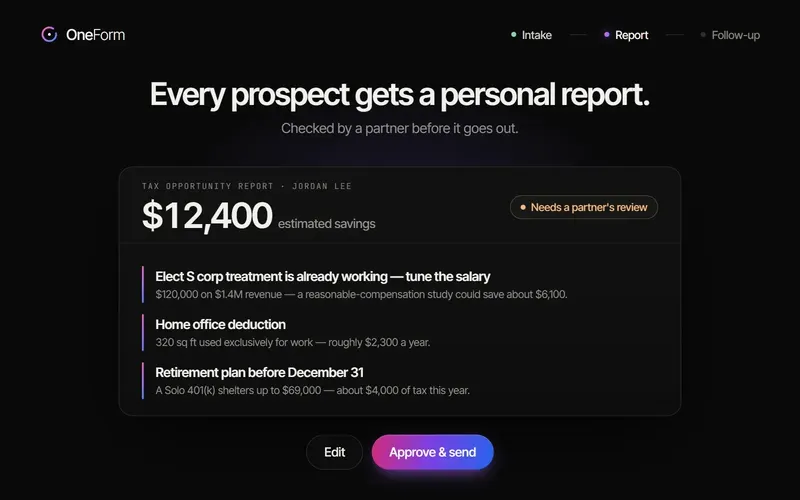
Reviewed before it's sent
Every draft waits for a partner, with the client's answers beside it.
What is a tax planning questionnaire?
A tax organizer collects last year's facts for the return. A tax planning questionnaire asks what is changing and what is planned, so the firm can act before year-end: income up or down, a business starting or selling, property bought, a retirement date set, equity vesting. It asks in bands and situations, not exact figures or identifiers, and it should take a client ten minutes on a phone. The answers are the raw material for a planning conversation, and the report is what gets the client to book it.
Which tax checkups are ready to use?
Ten checkups come with their questions, logic and report instructions written, in three groups: business, real estate and personal. Use them as they are, change any question on the live preview, or ask OneFormAI to make one shorter or add a branch. Each produces a named report after review. Every one asks for ranges and situations, never account numbers or Social Security numbers.
- Business: Tax Opportunity Report, Business Owner, S Corporation, and Should I Be an S Corporation?
- Real estate: Real Estate Investor and Short-Term Rental
- Personal: Year-End Planning, Retirement & Roth, Investment & Capital Gains, and Family, Children & Education
How does a checkup become a planning conversation?
The report is the bridge. OneFormAI drafts it from the answers to your instructions, with a booking link variable inside, and a partner reviews it with the answers beside the text. Approve it and the client gets a branded PDF by email with a Book your strategy call button under it. Opens and clicks are tracked, the lead score rises when they come back to it, and your team is emailed when a lead turns hot. The call lands on your Google Calendar with a Meet link.
Can you charge for a tax assessment?
Yes, on every plan, through your own Stripe account. Put a price on the form's report and an offer card on the thank-you screen with a headline and benefit bullets. The client pays there, in USD, CAD, GBP, EUR, AUD or NZD, and the report is sent after your review or automatically once approved. Hide the offer on endings like not a fit, waive it for anyone, and refund all or part of an order.
How do firms run a year-end planning season?
Send the Year-End Tax Planning Checkup to the client list in October with each client's ID in a hidden field, and let the pipeline run. Drafts queue in the review pile with a count on the sidebar, a digest reminds reviewers when drafts wait too long, and the Report pipeline in Insights shows drafted, sent and waiting. A workflow nudges clients who stop halfway, posts each response to Slack and files every approved PDF in Google Drive. Drop-off by question shows where a long checkup should be trimmed.
How do you keep AI-drafted tax reports accurate?
Write instructions that say what the report may and may not conclude, test them on a sample response, and read every draft before it goes. Drafts can link only to your website or booking page. Reviewers rate each draft from one to five stars, and every few ratings OneFormAI updates its writing rules for that form; you can read and edit those rules in the Report tab. If the AI is unavailable, a plain summary of the answers is drafted instead.
A CPA firm in North Carolina runs a fall planning push
A year-end season from the first send to the planning calls, using the ready-made checkup.
- 01
In September a partner opens the Year-End Tax Planning Checkup, shortens two questions and writes report instructions that name the firm's planning package, then tests them on a sample response.
- 02
The firm puts a price on the report for new prospects on its website, and sends the free version to existing clients with their client ID in the link.
- 03
A client answers in eight minutes. Yes to a business sale opens the transaction questions; the education branch is skipped.
- 04
OneFormAI drafts his Year-End Tax Action Plan. The partner moves the sale to the top, approves, and the PDF goes out with a Book your strategy call button.
- 05
He opens it twice and books. The call lands on the partner's Google Calendar with a Meet link, and the lead turns hot.
- 06
A workflow files the PDF in Google Drive and posts to Slack. Reviewers get a digest each morning with the drafts still waiting.
- 07
In November, Insights shows which question loses people, and the partner trims it.
Start from one of these
Questions, answered.
Is a tax checkup report tax advice?
The report is a draft prepared from the client's answers to your firm's instructions, and nothing is sent until someone on your team reviews and approves it. What goes out is your firm's document, under your name. Write the instructions to say what the report may conclude, and read the Section 7216 guide before using client answers in AI drafting.
What do the checkups ask for, and what stays out?
Ranges and situations: revenue bands, entity type, which accounts exist, what changed, what is planned. They never ask for Social Security numbers, EINs, account numbers, dates of birth or documents, and neither should a questionnaire you build. Connected-app credentials are encrypted at rest, AI drafting runs with data storage turned off at the AI provider, and the security page covers the rest.
Can we edit the ten checkups?
Yes. They are normal forms. Click any text on the live preview to change it, drag questions to reorder them, add a branch, or describe a change to OneFormAI and it is applied as one edit you can undo. The report instructions are yours to rewrite too, and a sample report shows the result before anything is sent.
How many OneAI Tokens does a report use?
A few. One token is about two cents of AI cost, and each report uses what it actually costs: roughly four tokens on Free and Basic, which use a lighter model, and about ten on Pro and Firm. Free Forever includes 50 tokens a month, Basic 250, Pro 1,000 and Firm 3,000, and extra tokens are 250 for $10.
Can we charge for the checkup report?
Yes, on every plan including Free Forever. Connect Stripe, set a price, and the client pays on the thank-you screen before the report is prepared. It is sent after your review, or on its own once approved if you choose. You can also charge for the planning call itself, with the time held while they pay and a refund if they cancel early.
Good advice starts with good questions.
Create your firm in a minute and send your first form today.