What happens after submit, handled.
Draft the report, wait for approval, email the PDF, alert your team, log it to a sheet. Build it once and it runs on every response.
Branch on anything
Send hot leads to a partner and everyone else to a follow-up.
One-click apps
Slack, Discord, Google Sheets, Drive and webhooks. No keys to paste.
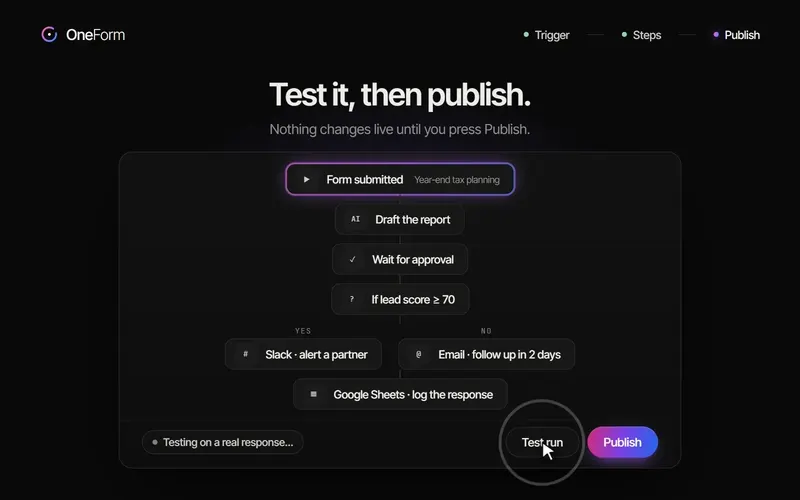
Test before it's live
Try a run first. Changes go live only when you publish them.
Build it once. It runs on every response.
Every form already follows a default pipeline: submit, draft the report, review, send. Workflows let you change that pipeline and add to it, with branches, waits and steps that reach your other apps. Start from one of nine recipes, test it against a real response, and publish when it's right. Workflows are in beta.
- 01
Pick a trigger
A form submitted or left unfinished, a report approved, sent or opened, a payment, a call booked, moved or cancelled, or a lead turning hot.
- 02
Add steps
Draft the report, wait for approval, send emails, pause for hours or days, and post to Slack, Discord, Google Chat, Sheets, Drive, your CRM or a webhook.
- 03
Branch on anything
If/else on answers, scores, device, language, UTM tags or report status. Insert answers and earlier steps' results into any field.
- 04
Test, then publish
Run it against a real response; outside sends are marked as tests. Live workflows change only when you press Publish.
Who it's for
Accounting firms
Route hot prospects to a partner, alert the team in Slack, and file every approved report in Google Drive.
Tax preparers
Nudge clients who stop halfway through an organizer, and log every submission to a Google Sheet.
Financial advisors
Send a confirmation, wait for the plan to be approved, then email it and add the prospect to your CRM.
Start from a template
Questions, answered.
Do I need workflows to send reports?
No. Every form has a built-in submit, report, review and send pipeline. Workflows are for changing it or adding steps.
Which apps can a workflow use?
Slack, Discord, Google Chat, Google Sheets, Google Drive, HubSpot, Pipedrive, Salesforce, Zoho CRM, Anchor, and webhooks to your own API. Apps connect with a sign-in, except Anchor, which uses an API key from your Anchor account.
What happens if a step fails?
Every run has a step-by-step history, and you can retry it from the step that failed.
Can a workflow follow up with people who don't finish a form?
Yes. “Form left unfinished” is a trigger, so a workflow can nudge people who stop halfway without cluttering your responses inbox. One of the nine recipes is set up to do exactly that.
Can I try a workflow before it goes live?
Yes. Run it against a real response; anything sent outside OneForm is marked as a test. Changes go live only when you publish them.
Good advice starts with good questions.
Create your firm in a minute and send your first form today.