A whole form from one sentence.
Describe what you need, or attach the PDF, photo or spreadsheet you use today. OneFormAI asks a couple of quick questions, then writes the questions, the logic and the report.
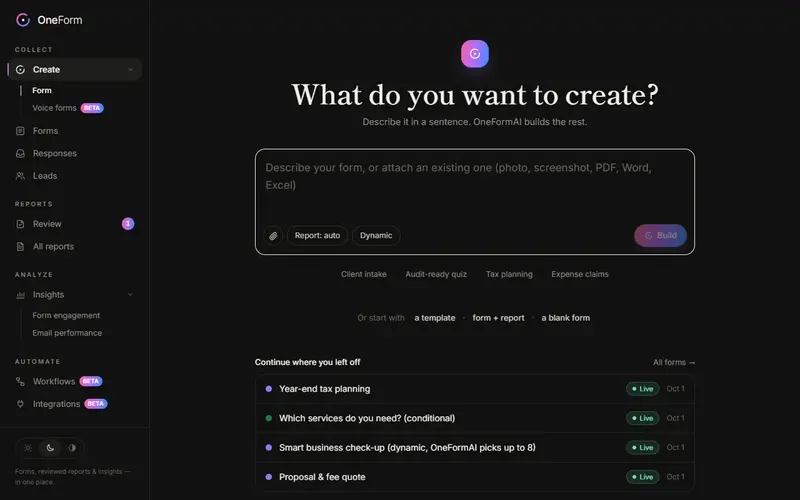
Build from a file
Photos, screenshots, PDFs, Word and Excel files become editable forms.
Logic included
Branches, scores and multiple endings, written for you and easy to change.
Report included
Every form can draft a report or document from each response.
From one sentence to a form you can send.
Most firms already have the questionnaire, in a PDF, a spreadsheet or someone's head. OneFormAI turns it into a working form: one question per screen, with branching logic, scoring and a report that drafts itself from every response. You stay in the builder the whole time, so anything it writes can be changed by hand or by asking.
- 01
Describe it or attach a file
Type what the form is for, or attach up to six files: photos, screenshots, PDF, Word, Excel, PowerPoint or text. Pasting or dropping a screenshot works too.
- 02
Answer a few quick questions
OneFormAI asks a few tap-to-answer questions so the form fits your practice. Choose up front whether it drafts a report from each response.
- 03
Review the draft
You get the questions, choices, logic, scores and endings, plus the report instructions. Edit on the live preview, with autosave and undo.
- 04
Publish and share
Publish when it's ready, then share the link or embed it on your website. Each response drafts a report for your team to review.
Who it's for
Accounting firms
Turn the organizer, engagement checklist or intake PDF you already use into a branded form, without rebuilding it question by question.
Tax preparers
Build a seasonal intake or document-request form from last year's paperwork, then change it with a sentence like “make it shorter”.
Financial advisors
Describe a discovery questionnaire in plain words and get a form whose logic skips what doesn't apply to each prospect.
Start from a template
Questions, answered.
Can OneForm build a form from a PDF?
Yes. Attach the PDF, a photo or a screenshot of the form you use today and OneFormAI rebuilds it as an editable form, with its questions, choices and logic. Word, Excel, PowerPoint and text files work too, up to six files at a time.
Does the AI write the report as well?
It can. When you build a form, choose whether it should draft a report or document from each response. OneFormAI writes the report instructions, and you can test them on a sample response before anything is sent.
Can I edit what OneFormAI builds?
Everything it builds is a normal form. Click any text in the preview to change it, drag questions to reorder them, or describe a change to OneFormAI and it's applied as one edit you can undo.
Do I have to start with AI?
No. You can start from one of the ready-made tax checkup templates, a sample form or a blank form, and use OneFormAI only when it helps.
Good advice starts with good questions.
Create your firm in a minute and send your first form today.