Proposals, onboarding and check-ins, on autopilot.
Quotes that add themselves up, engagement letters drafted from answers, and onboarding that runs itself.
OneForm gives consultancies, law practices and advisory firms a scoping form that adds answers up into a fee estimate and drafts the proposal, scope of work or engagement letter for review. Once approved, it goes out as a branded PDF with a booking button. Onboarding and check-in forms run on the same pipeline.
Quotes that calculate
Answers add up to an estimated fee and a Good / Better / Best proposal.
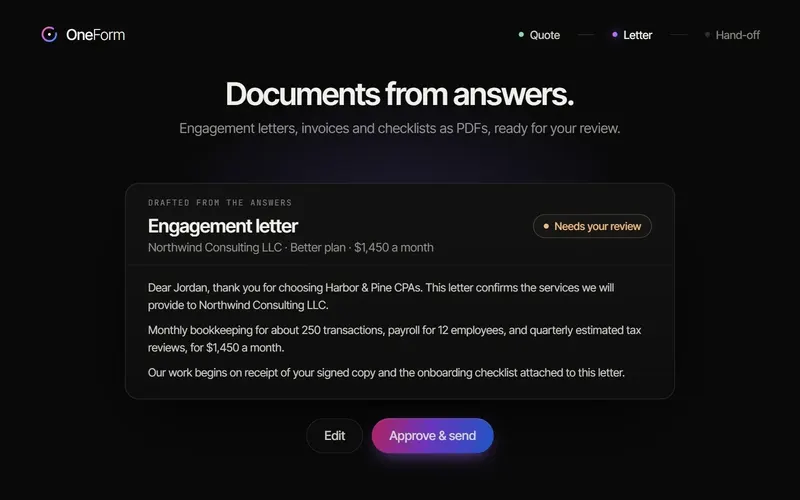
Documents from answers
Engagement letters, proposals and checklists as PDFs.
Hand-offs that happen
Workflows alert your team and log every client to a sheet.
How can a form price a proposal?
Give each answer points, or add a number or a line-item total to a named score, and the form keeps a running estimate as the prospect answers. Several scores can run at once: one for complexity, one for hours, one for risk. Multiple endings then show the right tier: a Good, Better or Best package, or a polite referral when the budget is below your minimum. Earlier answers and scores can be recalled in any later text, so the ending can say what the estimate is and why.
- Line items with quantity, price and tax, totalled in seven currencies
- If/else logic on any answer, with 17 comparison operators
- A logic map in plain English and a Try it preview for every path
Can a form draft an engagement letter or scope of work?
Yes. Choose a document instead of an advisory report and OneFormAI drafts it from the answers: engagement letter, proposal, scope of work, onboarding packet, checklist, task list or memo. The wording of the email and its button fits the document. Every draft waits for someone on your team to approve it, and totals in any table are calculated by OneForm, not by the AI. The approved PDF goes out with your logo and colors. Signing happens in the e-signature tool you already use.
- Twelve document types, with instructions you write or have OneFormAI write
- Answers beside the draft while you edit
- Swap in your own PDF for one client, or deliver the same firm PDF to everyone
What belongs in a client onboarding form?
Onboarding is where you learn how to work with a client: who signs off, who answers questions, which tools they use, how they like to be contacted, what went wrong with previous providers. Keep it to preferences and context. Account numbers, logins and documents go through your portal or secure channel after the letter is signed, not through a form. Each response can draft an onboarding packet or an internal memo for the team, and a workflow can log the client to a Google Sheet and alert the account lead.
- Contacts, roles and preferred channels
- Systems in use, deadlines, reporting cadence and what success looks like
How do check-in forms keep engagements on track?
A short check-in form once a quarter catches scope creep before the invoice argument. Ask what changed, what is blocked, and what the client expects next. Mark the report as internal so the draft goes to the engagement lead, not the client, and let a workflow post it to Slack and add a row to Google Sheets. People who stop halfway can be nudged by a workflow, and a hidden field in the link carries the client's ID so the response lands against the right engagement.
What happens after a proposal is sent?
The proposal email records when it is delivered, opened and clicked, and a reminder with the PDF attached goes out if it is not opened. A booking button under the document lets the prospect pick a time on your booking page. If your firm quotes in Anchor, a workflow can turn the answers into an Anchor proposal draft with the right services and start the onboarding steps once it is signed. Leads are scored on fit and intent, so the ones who keep re-opening the proposal rise to the top.
A boutique consultancy in Texas quotes from a form
A scoping form that ends in a proposal, an engagement letter and a kickoff call.
- 01
A partner describes the scoping questionnaire to Create with AI, then sets points so headcount, systems and timeline feed a complexity score.
- 02
Three endings are set by score: a Starter package, a Standard one, and a referral ending below the firm's minimum.
- 03
A prospect answers on the firm's website. The ending shows the Standard package and its estimate, recalled from the score.
- 04
OneFormAI drafts a proposal from the answers. The partner adjusts the deliverables, approves, and the PDF goes out with a Book a kickoff call button.
- 05
The prospect opens the PDF twice and books; the lead turns hot and Slack hears about it.
- 06
After the call, an engagement letter drafted from the same answers goes out for signature in the firm's e-signature tool.
- 07
A workflow files the approved PDFs in Google Drive and adds the client to the engagements sheet.
Start from one of these
Questions, answered.
Can clients sign the engagement letter inside OneForm?
No. OneForm drafts the letter from the form's answers, your team reviews and approves it, and it goes out as a branded PDF. Signing happens in the e-signature tool your firm already uses, so the letter is always a reviewed document before anyone signs it.
How accurate are the fee estimates and totals?
Scores and line-item totals are calculated by OneForm from the rules you set, never by the AI, and a logic map shows every rule in plain English. The estimate is only as good as your points, so test each path with the Try it preview. Totals in any document table are summed to the cent by OneForm.
What should stay out of an onboarding form?
Bank and card numbers, tax identifiers, logins, dates of birth and documents. A OneForm form collects preferences and context; sensitive details and files go through your portal or secure channel after the engagement letter. Connected-app credentials are encrypted at rest, AI drafting runs with data storage turned off at the AI provider, and the security page lists the rest.
Does it work with Anchor or our proposal tool?
Anchor is a native integration: connect it with an API key from your Anchor account, and a workflow turns answers into a proposal draft with the right services, then starts steps when it is signed. Other tools receive each response by signed webhook, through the REST API, or as a row in Google Sheets, on Basic and up.
Can one form serve several services?
Yes. Ask what the prospect needs first, then jump to the branch for that service. Show or hide questions on earlier answers, combine conditions with AND or OR, and give each service its own ending and report instructions. OneFormAI can write the branches and warns about jumps that go backwards or reference deleted questions.
Which plan does a small professional services firm need?
Free Forever includes three live forms, 50 responses a month and reports with review. Basic at $19 a month adds unlimited forms, embeds, webhooks and three workflows. Pro at $49 adds three seats, lead scoring and unlimited workflows with every integration, Anchor included. Firm at $149 adds five seats, team roles and your own sending domain.
Good advice starts with good questions.
Create your firm in a minute and send your first form today.