The Google Forms alternative for firms.
Google Forms is free, simple and part of Google Workspace. OneForm adds what a client-facing firm needs on top: your branding, logic and scoring, and a reviewed report sent to every client.
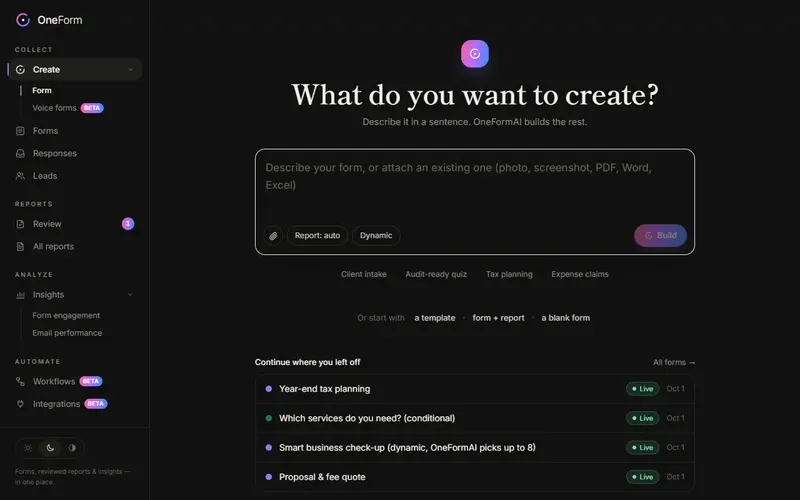
From form to finished report.
What a client-facing firm needs from a form, and how OneForm does each part.
| What you need | How OneForm does it |
|---|---|
| Build a form fast | Describe it in a sentence, or attach the PDF you use today. OneFormAI builds it. |
| Turn answers into advice | An AI-drafted report or document from every response, following your instructions. |
| Stay in control | Nothing reaches a client until someone on your team approves it. |
| Deliver professionally | A branded PDF, emailed now or on a schedule, with opens and clicks tracked. |
| Get paid for the report | Price the report and take payment on the thank-you screen with Stripe. |
| Book the next meeting | Your booking calendar on the thank-you screen, pre-filled. |
| Know who to call first | Every person scored on fit and intent, synced to your CRM. |
| Let clients talk | Voice forms: people speak, OneFormAI fills in the answers. |
Google Forms is a trademark of its owner. OneForm isn't affiliated with Google Forms.
Questions, answered.
Is OneForm a Google Forms alternative?
Yes, for firms that want forms to end in a client-ready report. OneForm also sends responses to Google Sheets and report PDFs to Google Drive.
Can I move my Google Forms to OneForm?
Yes. Take a screenshot or export a PDF of the form you have, attach it in OneForm, and OneFormAI rebuilds it as an editable form — questions, choices and logic included. Then add the report.
Does OneForm connect to Google Sheets?
Yes. A one-click Google Sheets connection adds a row for every response, with answers, score and report status.
From form to finished report, automatically.
Create your firm in a minute and build your first form today.