Speed to lead for an accounting firm is how quickly a prospect moves from "I'm interested" to a clear next step. It isn't only how fast someone on your team replies. It's what your website does the moment someone clicks Submit: asks the right questions, sends each prospect down the path that fits them, and tells them exactly what happens next.
Key takeaways
- Speed to lead is about how fast your website moves a prospect to the next logical step, not only how fast your team answers an email.
- In a Harvard Business Review study of 2,241 US companies, firms that tried to reach a web lead within an hour were nearly seven times as likely to qualify it as firms that waited even an hour longer.
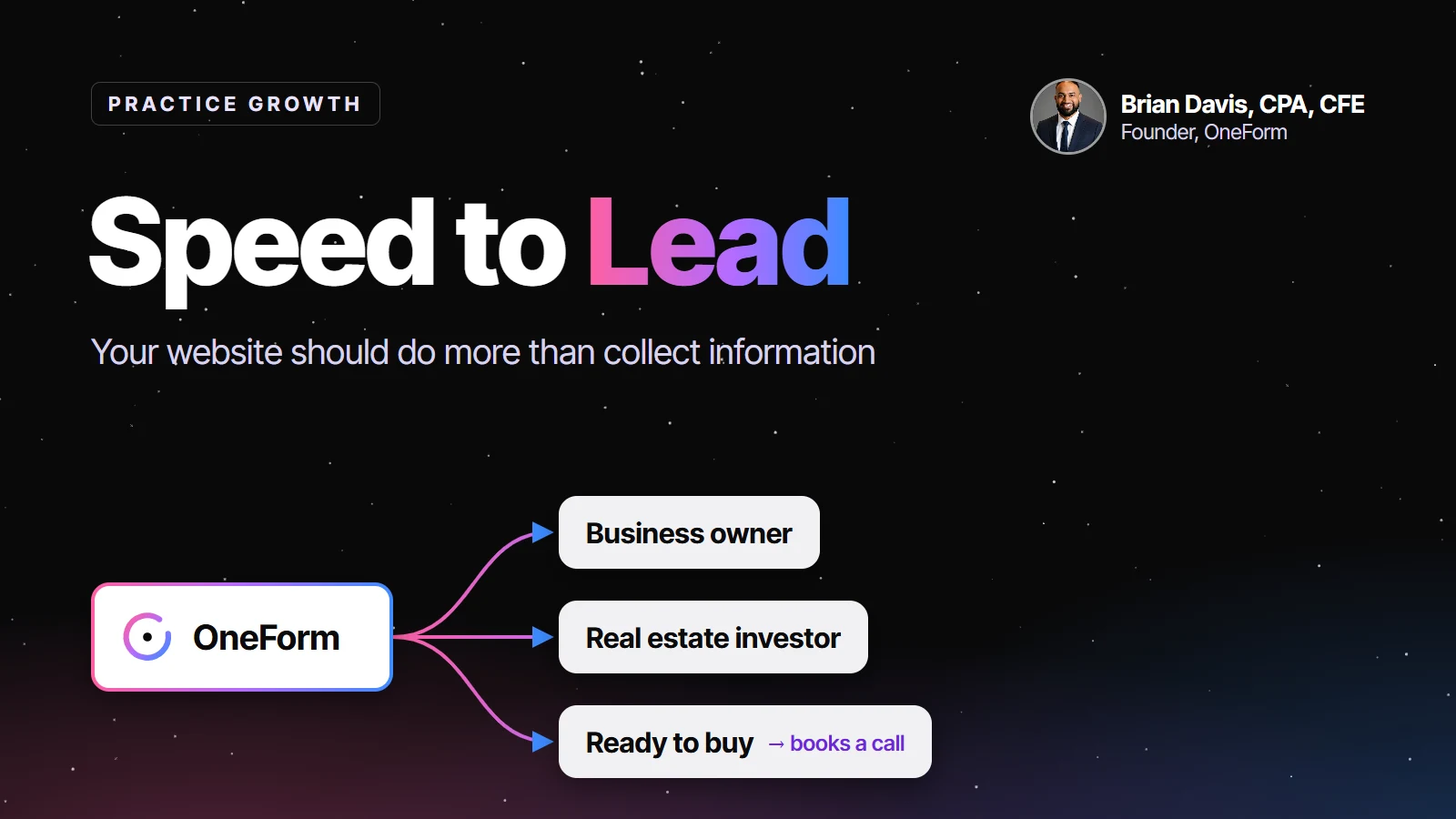
- A business owner, a real estate investor and a ready-to-buy client shouldn't get the same generic response. A few questions can route each one to a different path.
- Not every path has to end in a sales call. The next step can be a checklist, a video, a report, a proposal or a booked meeting.
- A well-built form can be the starting point that tells your CRM, calendar, email and team what to do next.
Try OneForm free. Build an intake form with conditional questions, a different ending for each type of prospect and a booking calendar on the thank-you screen, then connect the follow-up. Start free, no card needed.
What happens after someone clicks Submit on your website?
Think about the last time you visited a website because you were interested in buying something or working with a company. You probably wanted to know three things: Can they help me? How do I get started? And what happens next?
Your prospective accounting clients are no different.
Yet many accounting firm websites still work the same way they did years ago. Someone visits the website, clicks Contact Us, fills out a generic form, and waits. Maybe someone responds that afternoon. Maybe tomorrow. Maybe three days later.
In the meantime, that prospective client might have already contacted another firm.
That's why speed to lead is becoming an increasingly important part of how accounting firms attract, qualify and convert new clients. And speed to lead isn't just about how quickly someone on your team responds. It's about how quickly your website moves someone toward the next logical step.
Why does speed to lead matter for accounting firms?
Interest fades fast. In "The Short Life of Online Sales Leads," published in Harvard Business Review in March 2011, researchers sent a web lead to 2,241 US companies and timed the replies. Firms that tried to contact the lead within an hour were nearly seven times as likely to qualify it as firms that tried even an hour later. Among the companies that replied within 30 days, the average response took 42 hours, and 23% of the companies never responded at all.
The study is from 2011 and wasn't limited to accounting firms, but the lesson holds for any firm that sells advice: the prospect is most ready to talk in the minutes after they reach out. Every hour you leave them waiting, they are reading another firm's website.
The good news is that you don't need someone watching the inbox all day to act on that. You need a website that does part of the work for you.
Should your website be the beginning of a workflow?
Many accounting firms invest in their websites without fully considering what happens after someone fills out a form. They think about their branding, services, testimonials and contact page. But what about the experience after someone clicks Get Started?
- Does the prospect receive an email?
- Can they schedule a meeting?
- Do they receive more information about the service they asked about?
- Does someone on your team get notified?
Or does everything simply land in a shared inbox?
Your website shouldn't just collect inquiries. It should start the workflows that move your business forward, and ideally that process begins the moment someone interacts with your website.
Why shouldn't every prospect have the same experience?
Consider three people visiting the same accounting firm's website.
Prospect #1: The business owner
A business owner wants help with tax planning, payroll and business advisory services. After completing a short questionnaire, they could receive information specifically about your business advisory services, along with an invitation to take the next step.
Prospect #2: The real estate investor
A real estate investor is interested in rental property deductions, cost segregation or short-term rental tax strategies. Instead of receiving the same generic response, they could enter a different follow-up sequence with educational resources relevant to real estate investing.
Prospect #3: The ready-to-buy client
Someone has already researched your firm. They understand your services and are ready to make a decision. Why should they have to wait through the same process as someone who is just exploring?
Their form could ask: "Are you ready to speak with someone about getting started?" If they answer yes, the next screen could invite them to share their contact information, request a callback or book an available appointment. The firm might even set a response goal of contacting qualified prospects the same day or the next business day.
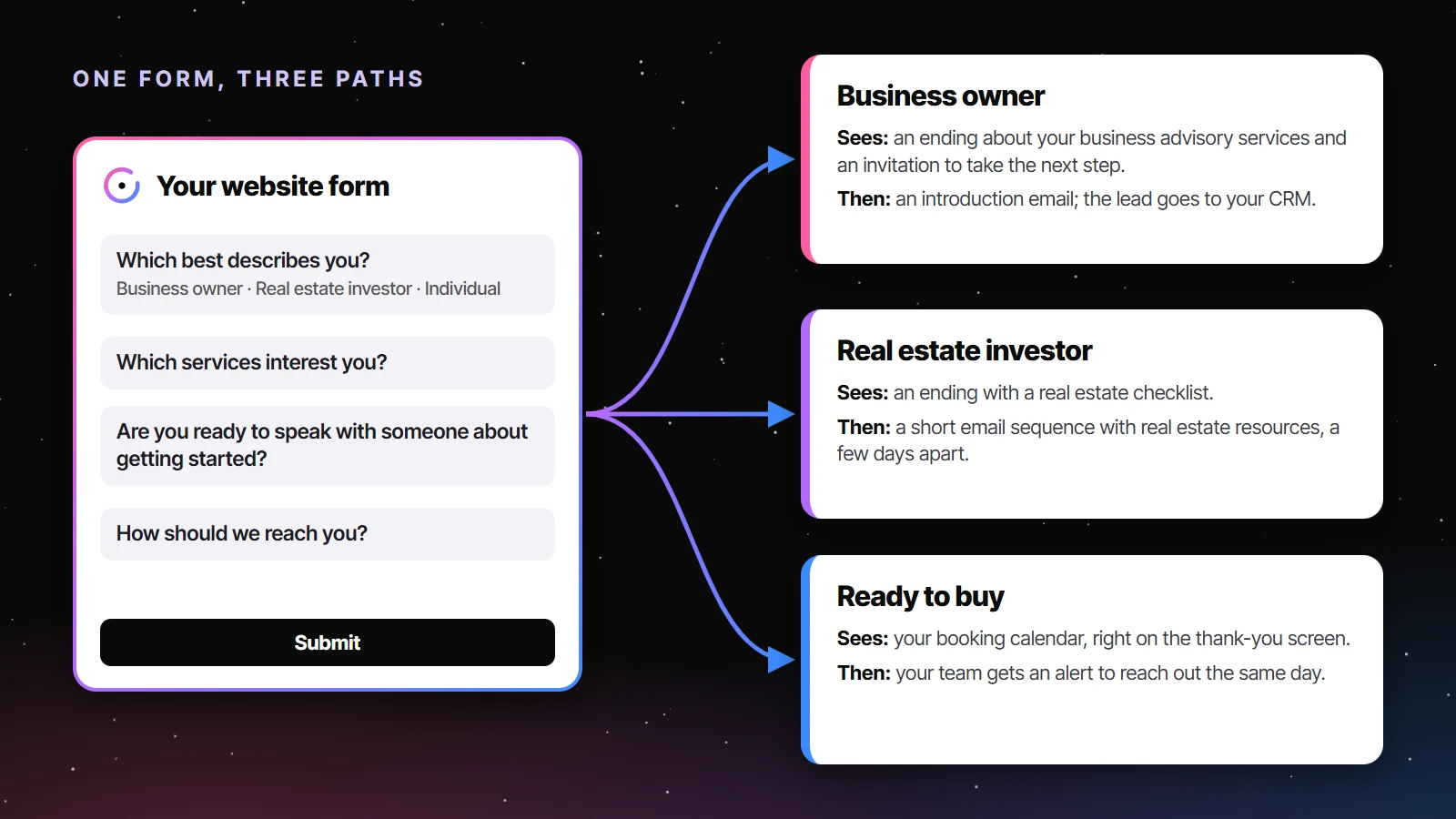
Three different prospects. One website. Three different experiences. That's the opportunity.
| Prospect | What their answers say | What they see after Submit | What starts behind the scenes |
|---|---|---|---|
| Business owner | Owns a business; interested in tax planning, payroll, advisory | An ending about your business advisory services, with an invitation to take the next step | An introduction email; the lead is logged in your CRM for follow-up |
| Real estate investor | Owns rentals; asks about cost segregation or short-term rentals | An ending with a real estate checklist | A short email sequence with real estate resources, spaced a few days apart |
| Ready to buy | Answers yes to "Are you ready to speak with someone?" | Your booking calendar, right on the thank-you screen | An instant alert to your team, so a qualified prospect hears from you that day |
What questions should a lead form ask?
Accounting firms already know how to ask questions. We do it during tax preparation, bookkeeping onboarding, advisory meetings and client reviews. But those questions often live in disconnected documents, PDFs, spreadsheets, emails or individual conversations.
What if the questions themselves could help determine what happens next? For example, a form might ask:
- Are you a business owner, real estate investor or individual taxpayer?
- What services are you interested in?
- Are you looking for immediate help or exploring your options?
- Would you like to schedule a consultation?
- What is your preferred way to communicate?
Based on those answers, your firm can create different paths. A business owner might receive an advisory introduction. A real estate investor might receive a specialized checklist. Someone ready to move forward might receive an invitation to book a meeting.
The experience becomes more relevant without your team having to sort through every inquiry by hand. Keep the form short, too: five or six questions are enough to route someone, and the detailed intake can come after they become a client. Our guide to the client intake form for accounting firms covers what to ask at that later stage.
Where should automation start in an accounting firm?
Accountants are investing more time and money into automation. We're automating bookkeeping, tax preparation, document collection, reporting and client communications. But there's another place where automation can make a meaningful difference: the very beginning of the client relationship.
Think about the different tools your firm already uses. You may have a CRM, scheduling software, an email marketing platform, a practice management system, proposal software and a client portal. Each tool serves a purpose. But something needs to connect them.
A well-designed form can become the starting point that decides which tools and workflows should activate. Someone submits their information, and the right next step begins without your team having to coordinate everything by hand. That might mean sending an email, routing an inquiry, generating a report or directing someone to a scheduling page.
And importantly, not every workflow needs to end with a sales call. Sometimes the next step is an educational video. Sometimes it's a checklist. Sometimes it's a proposal. Sometimes it's simply letting the prospect know when to expect a response. The goal is an experience that makes sense for the person completing the form. If you're looking for ideas for those resources, see our list of lead magnets for accounting firms.
Why we're building OneForm
This is one of the reasons we're building OneForm, an AI-powered form builder designed specifically for accountants.
We believe forms can do much more than collect names, email addresses and phone numbers. They can help accounting firms create customized experiences, ask better questions, qualify opportunities and connect the different systems that support their business.
With conditional questions, customized endings and connected workflows, firms can build experiences around the services they actually provide. And because OneForm is built by an accountant who understands the day-to-day operations of an accounting firm, we focus on the workflows practitioners use, not just generic form-building features.
We think of OneForm as the connective glue between the different tools and workflows inside an accounting firm. Your website is where the relationship begins. Your forms help determine where it goes next. And your technology should make that transition easier.
How do you set up the three paths in OneForm?
Everything in the example above works in OneForm today. Here's the setup, start to finish:
- Build the form. Describe it in one sentence and let OneFormAI draft it, or start from a template like the Business Owner Tax Checkup or the Real Estate Investor Tax Checkup.
- Add the routing questions. "Which best describes you?" and "Are you ready to speak with someone about getting started?" Jump rules skip anyone past the questions that don't apply to them.
- Give each path its own ending. Multiple endings are chosen by answers or by score, so the business owner, the investor and the ready-to-buy prospect each see a different thank-you screen. Put your booking calendar on the ready-to-buy ending, and show it only to good-fit leads.
- Connect the follow-up. A workflow runs on every submission: an If/Else step checks the answers, sends the right email now, waits a few days and sends the next one. Alert your team by email, Slack or Teams, and draft a report or an Anchor proposal when it fits.
- Send the lead where you work. Every person becomes one lead, scored by fit and intent, and can sync to HubSpot, Pipedrive, Salesforce or Zoho, or export to CSV.
- Put it on your website. Embed the form inline, as a popup or behind a button, and watch where people drop off question by question.
The questions, endings, booking calendar and follow-up emails work on every plan, Free Forever included. Website embeds start on Basic, and CRM sync on Pro. Want to see it with your own questions? Start free with OneForm.
Is speed to lead really about the client experience?
The firms that create better online experiences won't necessarily be the firms that respond to every inquiry within five minutes. They'll be the firms that make it easy for prospective clients to understand what happens next.
The ones that ask relevant questions. The ones that guide different people toward different services. And the ones that don't make prospective clients wait for a manual response just to find out how to get started.
The future of an accounting firm's website isn't just about generating leads. It's about knowing what to do with them. That's what we're building toward with OneForm.
Build better forms. Create better workflows. Give every prospect a clear next step. Build smarter client intake workflows with OneForm.
Frequently asked questions
What is speed to lead?
Speed to lead is the time between a prospect showing interest, such as submitting a form on your website, and that prospect reaching a meaningful next step: a reply, a resource, a proposal or a booked meeting. For accounting firms, the fastest next step often comes from the website itself, not from a person checking the inbox.
How fast should an accounting firm respond to a new lead?
As fast as you reasonably can, and ideally within the hour. A Harvard Business Review study of 2,241 US companies found that firms that tried to contact web leads within an hour were nearly seven times as likely to qualify them as firms that waited longer. An automatic, relevant next step on your website buys you time for the personal reply.
Can a website form qualify accounting leads automatically?
Yes. A few routing questions, such as who the prospect is, which service they want and whether they're ready to talk, let the form score the answers and choose what happens next. Good-fit prospects can see your booking calendar right away, while others get resources that match their situation and a follow-up from your team.
What should happen after someone fills out an accounting firm's contact form?
The prospect should immediately see what happens next: a thank-you screen that fits their situation, an email confirming you received their request, and either a way to book a meeting or a clear time when you'll be in touch. Behind the scenes, your team should be alerted and the lead should land in your CRM.
Do I need a CRM to automate lead follow-up?
No. A form tool with built-in workflows can send emails, wait between messages, alert your team and keep a list of leads on its own. A CRM helps once you have a sales process to track, and OneForm can sync leads to HubSpot, Pipedrive, Salesforce or Zoho when you're ready.