The Leads page turns your responses into a list of people. Someone who filled in three forms is one row, not three. Each person gets a lead score from 0 to 100, so the people most likely to become clients are at the top.
Find your best leads
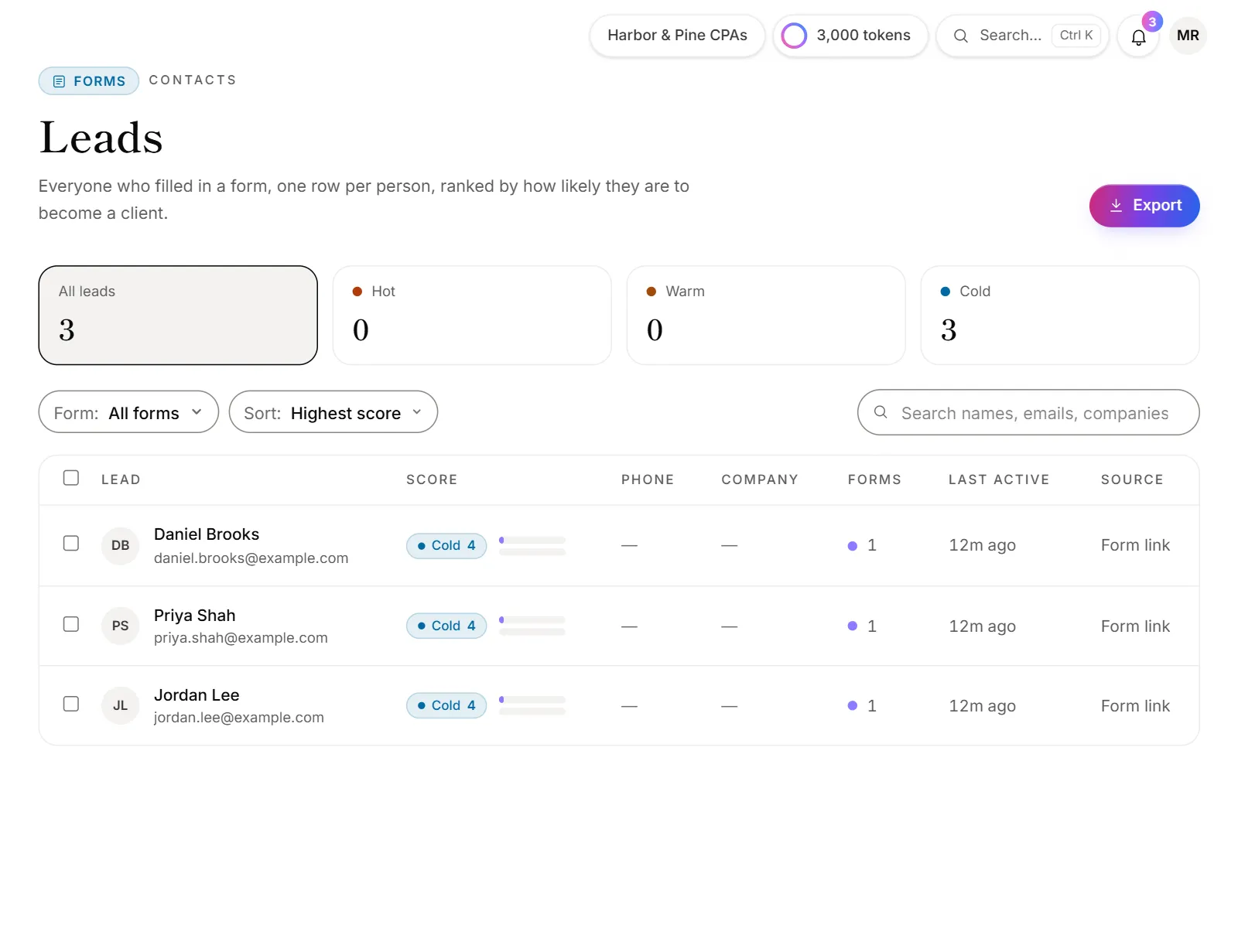
- Click Leads in the menu, under Forms.
- Click Hot, Warm or Cold at the top to see one grade, or All leads.
- Narrow the list with the form filter, or search names, emails and companies.
- Change Sort: to Highest score, Recent activity or Name.
- Click a person to open them.
What you see about a person
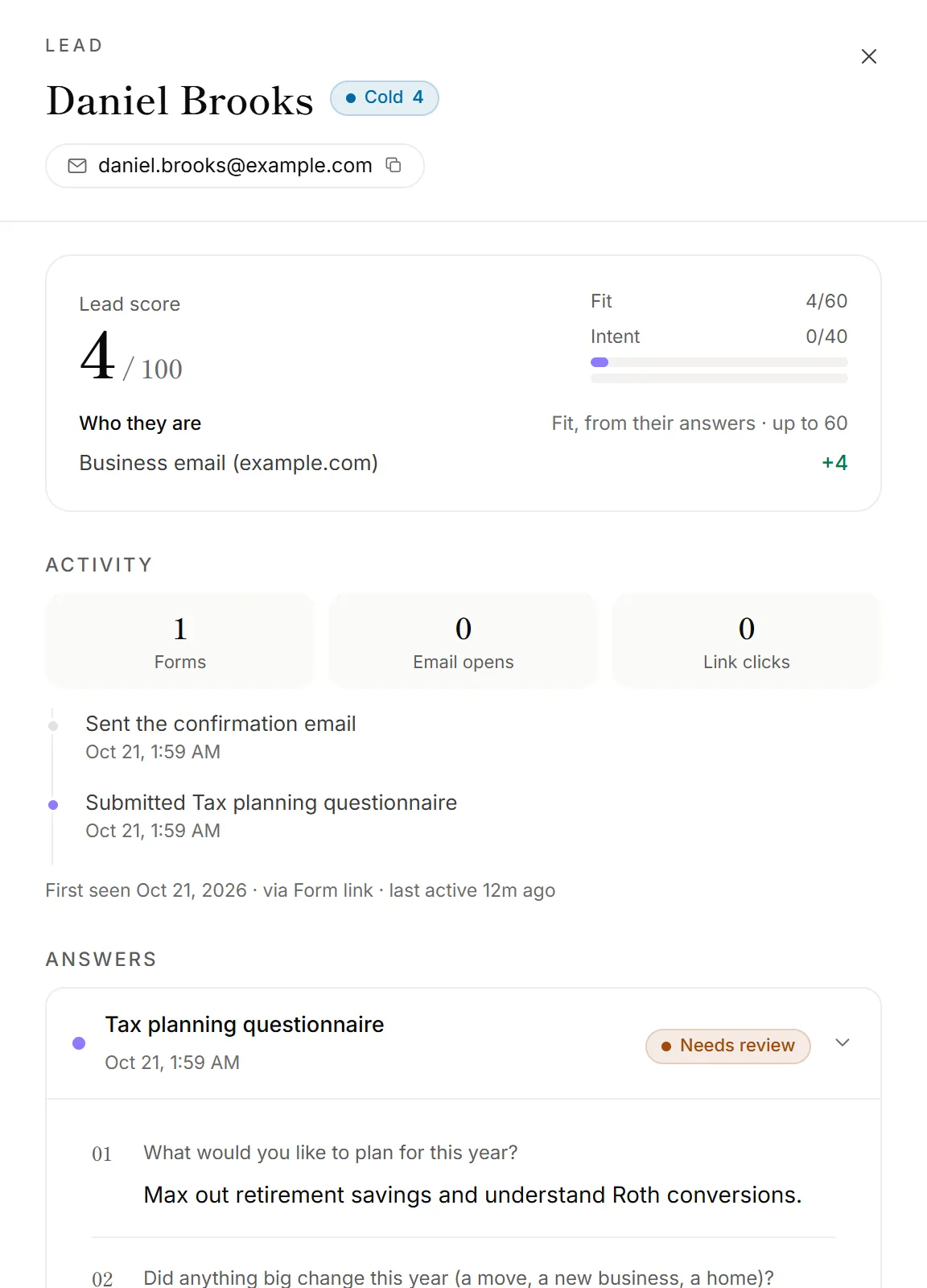
- Lead score, with every point explained.
- Activity: forms filled in, emails opened, links clicked, and a timeline of their visits and emails.
- Answers: each form they submitted, with its report.
- Sent to your CRM: where and when they were sent, if you've sent them.
- Their data: download or erase what you hold about them (admins and owners). See Delete a response or a client's data.
Click their email or phone number to copy it.
How the score works
The score adds up three things, and the reasons always add up to the total:
- Fit (who they are), up to 60. Points you give to answers in your forms, plus small boosts for a phone number, a business email address, a company name, and answering almost every optional question.
- Intent (what they did), up to 40. Filling in more than one form, coming back on other days, opening and clicking your emails, writing detailed answers, and coming from a referral or a campaign. Intent fades when someone goes quiet.
- Red flags. A throwaway email address, an email that bounced or was marked as spam, or finishing a form in under 15 seconds take points off.
The grade follows the score. By default, Hot starts at 70 and Warm at 40. You can change these and every point value. See Set up lead scoring.
How people are matched
- By email first. Every response with the same email address is the same person, whatever the capitals.
- Then by phone. A response with only a phone number joins the person who gave that number with an email, or becomes a lead of its own. "+1 (201) 555-0123" and "201-555-0123" count as the same number.
- Your firm's own addresses are left out: the contact email, reply-to and review team addresses in Settings. Tests you send from them don't show up as leads.
- Each firm is separate. Someone who fills in two firms' forms is a lead in each, and neither firm sees the other's.
Source shows where they first came from: a campaign tag, the site that linked to the form, "Form on your website" or "Form link".
Good to know
- Scores update by themselves. A new submission, an opened email or a change to your scoring settings updates the score.
- Viewing leads and doing more with them are separate. Depending on your plan, you can view the Leads page, or also download leads, send them to your CRM, get Hot-lead alerts and change the scoring.
Why isn't someone on the Leads page?
- They gave no email or phone number. The page says how many responses that applies to, with a link to see them on Responses.
- Their response is waiting past your plan's monthly limit. It shows once it comes through.
- They used one of your firm's addresses. Your contact email, reply-to and review team addresses are left out.