A report goes to the client only once someone on your team approves it. You can approve first and send later, or do both in one step.
Before you start
Reviewers, admins and owners can approve and send reports. The report needs a recipient email: check it on the Delivery tab.
Approve and send
- Open the draft from Review.
- Read it through and make any changes.
- Click Send in the top bar.
- Check the subject and the address in the dialog.
- Click Approve & send. If the report was already approved, the button says Send now.
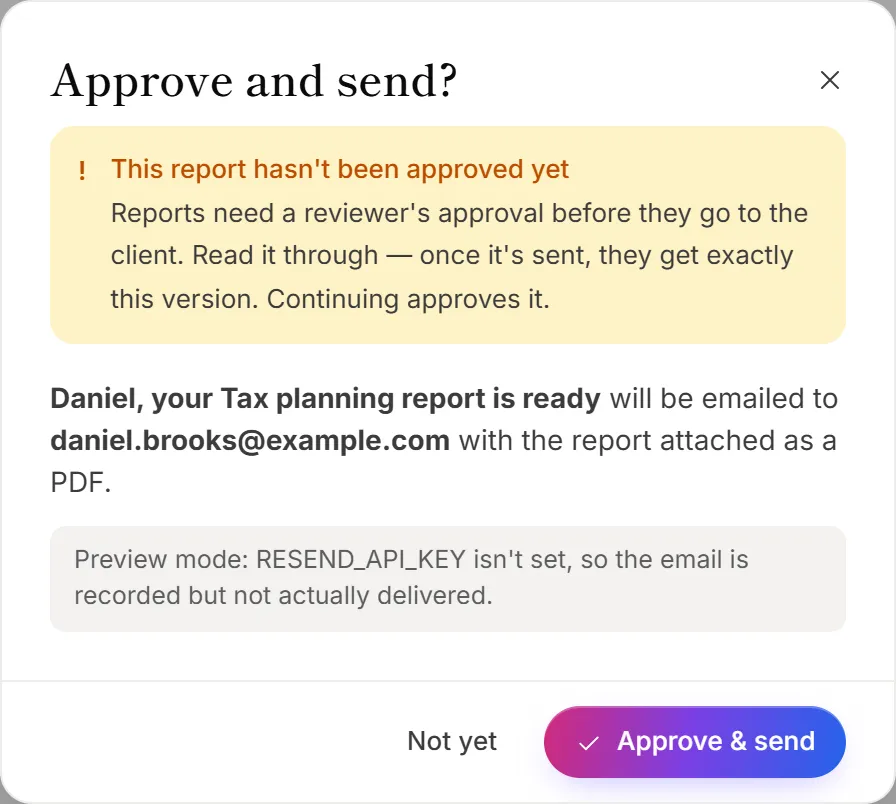
The client gets the email with the report attached as a PDF. The report moves to the Sent tab.
To approve now and send later, click Approve instead. The report moves to Approved. Click Back to review if you change your mind. To pick a time, use the clock button next to Send. See Schedule a report and send reminders.
Check that it arrived
Click the Activity tab. Each email shows its status, such as Sent, Delivered, Opened, Clicked, Bounced or Spam report, with a timeline of what happened. Click Refresh to check again.
Resend a report
- Open the sent report.
- Click Resend in the top bar.
- Choose Same address, or A different address and type it.
- To send future emails for this report to the new address too, tick Also make this the report's recipient email.
- Click Resend.
The same report goes out again with the PDF, and shows as Report resent in Activity. You can also resend from All reports: open the ⋯ menu on a report and choose Resend report.
Good to know
- Paid reports go out once paid. If a report is for sale and hasn't been paid for, the dialog asks Send without charging?, and sending it gives it away free. To charge for it, click Approve instead: an approved report goes out on its own when the payment arrives. See Charge for a report.
- Sent means final. A sent report can't be edited. Its page shows the version the client received.
- There are daily sending limits. OneForm limits how often one report can be emailed in a day, and how many new addresses your firm can email in a day. The message tells you when you've reached one.
Why does it say the address bounced before?
An earlier email to that address couldn't be delivered, so it may be mistyped. Check the address on the Delivery tab. If it's right, click Send anyway.
Why can't I send to this address at all?
The person marked an earlier email as spam, so OneForm won't email that address again. Ask them for another address. See Unsubscribes and bounced emails.
What does "Send failed" mean?
The email couldn't be sent. The report page says The last send failed, and the reason is on the Activity tab. Fix the problem, such as a wrong address, and click Send again. Your approval stays in place.
Why is the Send button greyed out?
The report has no valid recipient email, or it's still being drafted. Add the email on the Delivery tab.