Each form can show a taxpayer privacy notice and ask clients to consent, with a typed signature, to specific uses of their information, such as processing their answers with AI. OneForm records each answer and follows it: if a client says no to AI, OneFormAI isn't used for their response.
Your firm decides when consent is needed and is responsible for each consent request. Turning on the notice doesn't authorize any use or disclosure by itself, and OneForm doesn't give legal advice. For how OneForm handles tax return information, see Tax return information (IRC §7216) on the Security page.
Turn on the notice
- Open the form and click the Settings tab.
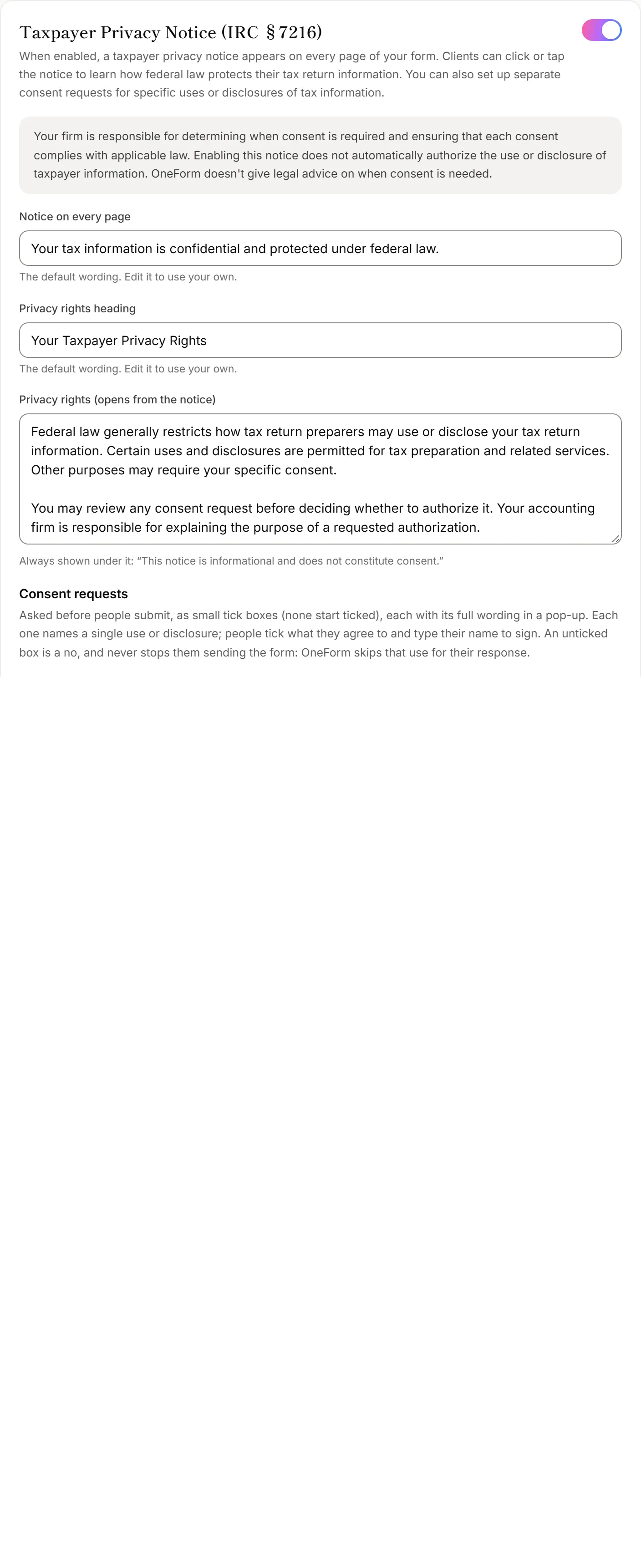
- Turn on Taxpayer Privacy Notice (IRC §7216).
It starts with default wording and two consent requests: AI processing and Other services. It saves automatically.
Change the notice
Each box starts with the default wording. Edit it to use your own, or click Reset to default.
- Notice on every page: the short line clients see at the bottom of every screen of the form.
- Privacy rights heading and Privacy rights (opens from the notice): the longer explanation clients see when they click the notice. A line saying it's informational and isn't consent is always added under it.
Set up consent requests
Each request asks about one use or disclosure. Add one with AI processing, Other services or Your own request, and remove one with its × button.
- AI processing is set by OneForm. It describes how OneForm sends answers to its AI service, so its wording can't be changed.
- Other services asks to use the answers to tell the client about your firm's other services. You can edit its wording.
- Your own request needs a Title and What it's for before it's shown to clients.
For each request you can edit, choose whether it asks to Use information or Disclose (share) it, who it's Disclosed to, the Information covered, and how many months it's Valid for. The statements the IRS requires are added under every request automatically. Click Show the required statements (added automatically) to read them.
What clients see
Before they submit, clients see each request as a tick box. None start ticked. They can open the full wording, tick what they agree to, and type their full name to sign. An unticked box is a no, and they can still send the form.
On dynamic and voice forms, the requests come before the first question, because those forms use OneFormAI while they're being filled in.
What OneForm does with the answers
| The client… | What happens |
|---|---|
| Says no to AI processing | OneFormAI isn't used for their response. Their report is a summary of their answers, with a note saying why. A dynamic form asks its questions in the usual order, and a voice form switches them to the typed form. |
| Says no to Other services | Their report doesn't suggest your firm's other services, and they aren't counted as a sales lead. |
| Says no to your own request | OneForm records it. Make sure your team doesn't use or share their information that way. |
| Agreed, but the consent ran out | It's treated as a no from the day it ran out. |
See a client's consent
Open the response from Responses. A chip in its header shows Consent given, Consent declined, Some consent declined or Consent expired. Below the answers, Taxpayer consent (IRC §7216) shows who signed, when, each answer, and the exact wording they saw.
Good to know
- Responses from before you turned it on carry no consent record and are handled as before.
- Reports set to send automatically still wait in Review when OneFormAI wasn't used because of a "no".
- Changing the wording later doesn't change past records: each one keeps the wording the client saw.
Why does a report say OneFormAI wasn't used?
The client said no to AI processing, or their consent ran out. The OneFormAI draft tab of the report says which. The draft is a summary of their answers: edit it by hand before you send it.